Is Google Forms Anonymous? What Owners See and How to Check
A banner on top of every Google Form tells you if your email is being recorded. Look for that line in two seconds before you submit.
Short answer
Depends on form settingsA Google Form is only anonymous if the creator turned off email collection and sign-in requirements. On a work account it starts out recording your email, and the top of the form tells you which kind you've got before you type a word. Below is what that looks like in each case, and what the owner still sees when your email isn't recorded.
- Workspace default
- Restricts to domain
- Email collection
- 3 mode options
- Minimum group threshold
- None (shows #1)
- Submission timestamps
- Recorded on row
- Edit-after-submit link
- Tied to Google account
For HR and team leads
Switch this survey to cryptographic anonymity in 30 seconds
Import the form you already have. Answers get sealed on each person's device from the first response.
For employees
Asked to take a Google Forms survey?
Check this Google Forms survey in eight questionsWhatever the tool, your comments are the easiest way to be recognized. Leave out projects, dates and anything only you would know.
Wish it worked like this? Tell us where you work. We'll reach out to whoever runs it, and they'll never know who asked.
Or send HR a note yourself. It'll come from you, so only if that feels safe.Hi, thanks for running this survey. I want to answer honestly, and I'd feel more comfortable if responses couldn't be linked back to anyone, even by accident. Would you consider a tool like InviziPoll, which encrypts answers on our devices before they're sent? Happy to share more if it helps.
✓What we say about Google Forms here was last verified on 2026-09-28 against Google Workspace Admin Help and Google Docs Editors Help. The banners and settings below reflect how Google Forms handles identity on personal and Google Workspace accounts.
01What makes a Google Form identifiable
These are the settings and question types that decide whether an answer can be traced back to a person.
| Setting or question | What it does | What the owner gets |
|---|---|---|
| Collect email addresses: Verified | Makes respondents sign in, then saves their Google account email with the response | Their email, next to their answers |
| Collect email addresses: Responder input | Adds an email field that respondents fill in themselves | Whatever email they typed |
| Collect email addresses: Do not collect | Saves no email address | No email |
| Limit to 1 response | Makes respondents sign in so Google can block a second submission | No email unless collection is on, but nobody can answer without signing in |
| A file upload question | Makes respondents sign in, then saves the file to the owner's Google Drive | The file, with the uploader's name added to the file name |
| Responders limited to specific people, groups, or your organization | Makes respondents sign in so Google can check they're allowed | No email unless collection is on |
| A pre-filled link | Opens the form with some answers already filled in | Whatever was pre-filled, such as a name or employee ID |
| Questions about team, role, location, or start date | Lets the owner filter responses | On a small team, often enough to single someone out |
Google reworked the who-can-respond controls in January 2026. You now choose, in the form's publish settings, between anyone with the link and specific people, groups, or audiences. Guides that describe a single "restrict to users in your domain" checkbox are describing the old version.
Two things are true on every form, however it's set up. Every response gets a timestamp, and on a small team, "submitted at 4
" plus who was around at 4 can be enough. And the owner can read every answer in full.See how a "Collect emails" setting compares with answers nobody can read, us included.
02How to make a Google Form anonymous
If you're collecting anonymous feedback with Google Forms, this is the setup that holds up.
- Open the form, click Settings, and expand Responses.
- Set Collect email addresses to Do not collect. On a work account it starts on Verified, so this is a change you have to make, not a default you can trust.
- Turn off Limit to 1 response.
- Delete any file upload questions.
- In the publish settings, let anyone with the link respond, not specific people, groups, or your organization. If your work account doesn't offer that option, respondents will have to sign in, and your invitation should say so.
- Send everyone the same link. Skip pre-filled links and mail merges that give each person a different URL.
- Cut questions that ask for a name, email address, or employee ID. Think hard about team, role, and start date if any group is small.
- Say what's true at the top of the form, for example: "This form doesn't collect names or email addresses. I can read each answer, but the form doesn't tell me who wrote it." There's more wording in our disclaimer examples.
- Test it before you send it. Open the form in a private browser window where you're signed out. If it opens without asking you to sign in, submit a test answer, then check the Responses tab and the linked Sheet for an email column.
Changing the settings later only affects new responses. Anything collected while the form was on Verified still has an email attached, including in the linked Sheet.
For the rest of the program, like how often to run it and what to do with the results, see how to run an anonymous employee survey.
03How to tell if a Google Form is anonymous when you're answering one
You can't open the owner's settings, but the form gives a lot away.
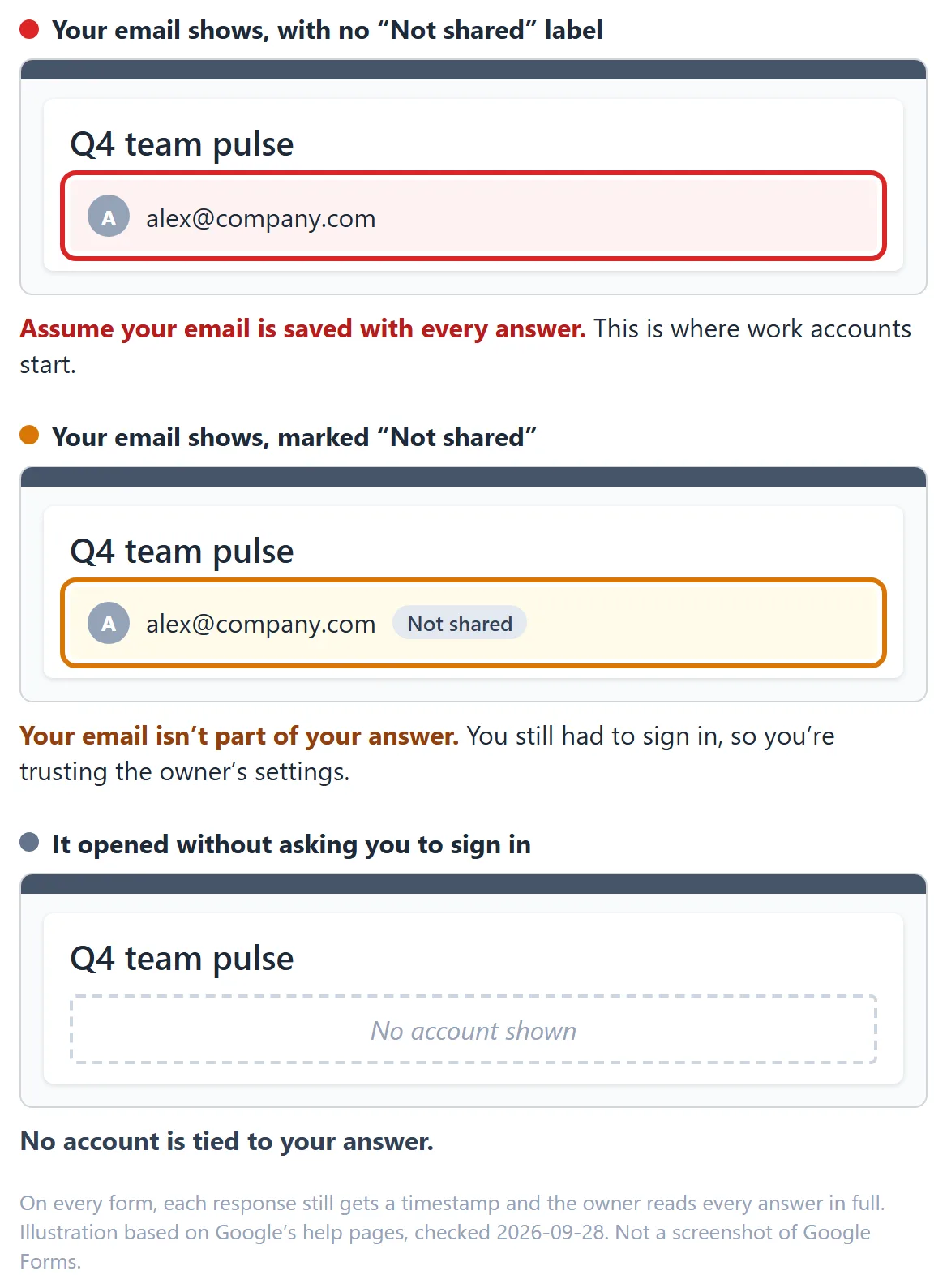
- Did it make you sign in? Then Google knows which account opened it. That doesn't automatically hand the owner your email, but you're trusting their settings.
- Look at the top of the form. If you're signed in and the owner isn't collecting your address, Google shows your account with a Not shared label, meaning your email and Google account aren't part of your response. If your email shows up without that label, assume it's being recorded.
- Is there a file upload question? You'll have to sign in to answer it, and your name goes on the file.
- Were any answers already filled in? A pre-filled link can tag your response with a name, ID, or team.
- Count the "about you" questions. Team, role, and start date on a 12-person team is a name with extra steps.
- Think about what you write. Even on a perfectly set-up form, the owner reads every answer. If your story is recognizable, so are you.
For the same checks on any survey tool, see how to tell if an employee survey is anonymous. For what to share and what to leave out, see how to stay anonymous in a workplace survey.
04What stays visible on an anonymous Google Form
- Every answer, in full. The owner and any editors see them in Forms and in the linked Sheet, and so does anyone that Sheet is shared with.
- A timestamp on every response.
- Your company's admins, on a work account. The form and its responses live in the company's Google Workspace, where admins can get to them.
What owners don't get is your IP address. It isn't part of the response data Google Forms shows them.
05Why employees still don't believe it
Even with every setting right, the people answering have no way to check any of it. They get a Google Form from HR, often on a work account where the default records emails, and they do the sensible thing: they answer carefully. That's the real cost, and it doesn't look like a failure. You just get polite answers instead of honest ones, and you make decisions on them.
For a sign-up sheet or training feedback, that's fine, and Google Forms is a good tool for it. For manager feedback, a pulse after layoffs, or anything touching misconduct, it's the whole problem.
That's the kind of survey we built InviziPoll for, so weigh our view accordingly. It's designed so nobody can connect an answer to the person who gave it, InviziPoll included, and results stay locked until enough people have answered that no one can be singled out. Employees don't have to take HR's word for it. See how InviziPoll compares to Google Forms, read about running an anonymous employee survey, or start a free trial.
Using Microsoft 365 instead? See Is Microsoft Forms anonymous? Comparing dedicated survey tools? See employee engagement survey tools.
Running the survey yourself? Paste it in and see which questions could identify the people answering. Nothing you paste leaves your browser.
FAQQuestions people ask
It can be, but not by default on a work account. Forms made on a Google Workspace account start out collecting verified email addresses. A form is anonymous when it collects no email, doesn't make anyone sign in, has no file upload questions, and asks nothing that identifies people.
Yes. Set Collect email addresses to Do not collect, turn off Limit to 1 response, remove file upload questions, let anyone with the link respond, send everyone the same link, and skip identifying questions. You'll still be able to read every answer, just not see who wrote it.
No: an anonymous Google Form doesn't record who answered (though the owner can still read every answer), whereas a confidential survey knows who answered and promises not to share it. If your form collects email addresses, you're running a confidential survey and should say so; see confidential vs anonymous surveys.
Only if the form collects email addresses, includes a file upload question, or asks something identifying. A sign-in requirement on its own doesn't send the owner your email. Timestamps and "about you" questions can still narrow it down, and the owner reads every answer.
Not anywhere the owner can see. IP addresses aren't part of the response data in Forms or the linked Sheet.
Not in the way most people mean. Signing in doesn't give the owner your email unless the form collects it, but Google knows which account opened the form, and you're trusting the owner's settings. If the form shows your account as Not shared, your email isn't part of your response.
You can change the settings, but only new responses are affected. Emails collected before the change stay with those responses and in the linked Sheet.

InviziPoll team
Updated Oct 24, 2026 · 7 min read