Is Microsoft Forms Anonymous? The Record Name Setting Explained
On a work account, Forms records your name and email by default. How to spot it above Question 1, before you hit Submit.
Short answer
One greeting banner decides itA Microsoft Form is only anonymous if the creator unchecked "Record name" or opened the link to "Anyone can respond." In Microsoft 365 workplace tenants, internal forms record your name and corporate email address by default, and a line right above Question 1 tells you which mode is active. Below is what that line looks like in each mode, and what the owner's spreadsheet still shows when your name is hidden.
- Enterprise default
- Records name & email
- Check method
- Top greeting line
- Minimum group floor
- None (shows #1)
- Excel export
- Timestamps & row ID
- Record name toggle
- Admin-controlled
For HR and team leads
Switch this survey to cryptographic anonymity in 30 seconds
Import the form you already have. Answers get sealed on each person's device from the first response.
For employees
Asked to take a Microsoft Forms survey?
Check this Microsoft Forms survey in eight questionsWhatever the tool, your comments are the easiest way to be recognized. Leave out projects, dates and anything only you would know.
Wish it worked like this? Tell us where you work. We'll reach out to whoever runs it, and they'll never know who asked.
Or send HR a note yourself. It'll come from you, so only if that feels safe.Hi, thanks for running this survey. I want to answer honestly, and I'd feel more comfortable if responses couldn't be linked back to anyone, even by accident. Would you consider a tool like InviziPoll, which encrypts answers on our devices before they're sent? Happy to share more if it helps.
✓What we say about Microsoft Forms here was last verified on 2026-09-28 against Microsoft Support documentation. The sources are listed at the end of this article.
On a Microsoft 365 work account, Record name is checked by default, and the greeting line right above Question 1 tells you whether it is on.
01How to spot the "Record name" setting before you submit
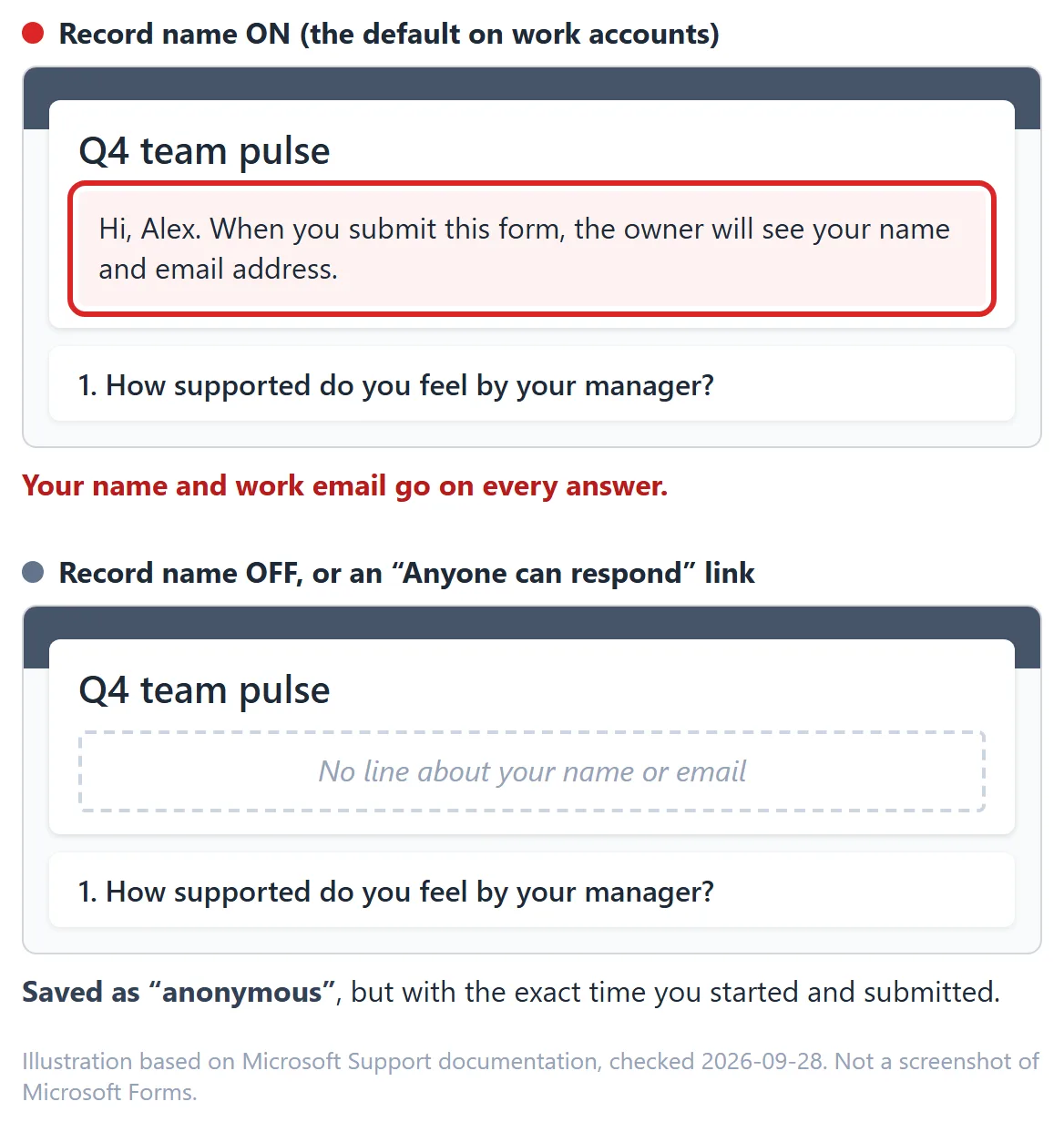
Unlike many survey tools that hide their tracking settings behind an admin login, Microsoft Forms usually gives respondents a visual clue right at the top of the page. Compare what you see on screen before you answer:
| How the owner set up the Microsoft Form | What you see at the top of the form | What appears in the owner's Excel export |
|---|---|---|
| Only people in my organization can respond + Record name is ON (the default on work accounts) | Usually shows "Hi [Your Name], when you submit this form, the owner will see your name and email address" | Your Email, Name, Start time, Completion time, and every answer on one row |
| Only people in my organization can respond + Record name is OFF | Requires your Microsoft 365 login to open, but does not warn that your name and email will be shown to the owner | anonymous in the Email and Name columns, plus Start time, Completion time, and your answers |
| Anyone can respond (public link, no login required) | Opens without a Microsoft login; no Record name checkbox exists in the owner's settings | anonymous in the Email and Name columns, plus Start time, Completion time, and your answers |
| Personal Microsoft account (Outlook.com, Hotmail, Live) | No organizational sign-in | Record name does not exist on personal accounts; Name and Email columns are always blank/anonymous |
02How Microsoft Forms handles identity behind the scenes
The key control is that single setting called Record name inside Settings > Who can fill out this form. On a work or school Microsoft 365 account, Microsoft checks Record name automatically whenever a form is restricted to people inside the organization.
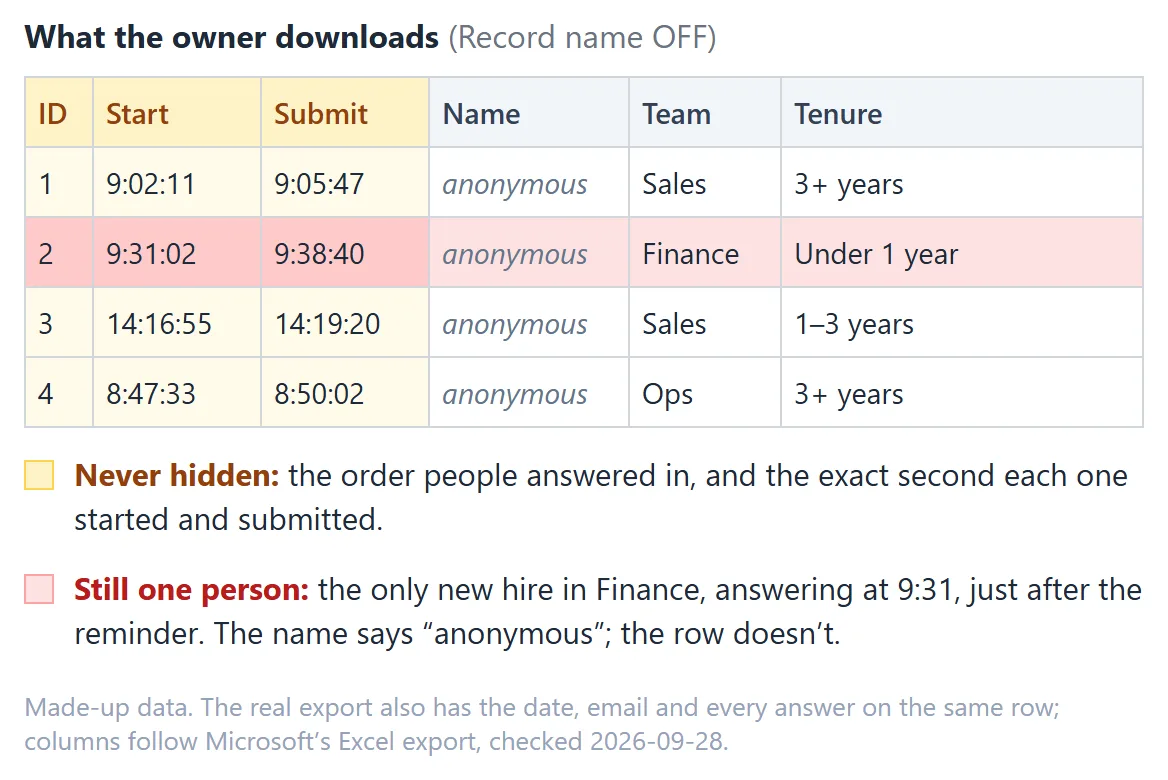
When Record name is unchecked by the owner, the respondent column in the results view and in the exported Excel workbook shows anonymous for every submission, even though each employee had to sign in with their work account to open the page.
Three caveats still matter even when the Name column says anonymous:
- Start time and Completion time are always recorded. Every row in the Microsoft Forms Excel export includes the exact date and second you started and submitted the form (
Start timeandCompletion time), plus a sequentialID(1,2,3...). If the form owner watches responses arrive after pinging a five-person channel, the timestamp narrows who answered. - All of your answers sit together on one Excel row. If Question 1 asks for your department, Question 2 asks for your office location, and Question 8 asks for open-text feedback, the form owner sees all three side by side on the same line.
- Explicit identity questions still save what you type. Unchecking Record name only stops the automatic Microsoft 365 profile capture. If the form itself includes a question asking for your name, email, or employee ID, whatever you type is saved as an ordinary answer.
See how the Record Name checkbox and Excel exports compare with browser-encrypted polling.
03When Microsoft Forms are anonymous and how to configure them
Are Microsoft Forms anonymous? Only if the owner configured them that way. Work and school forms default to recording names.
Can Microsoft Forms be anonymous? Yes, with the right sharing and settings:
- Uncheck Record name, or use an Anyone can respond link (where no Record name option exists).
- Remove name, email, and employee-ID questions from the form body.
- On a small team, avoid asking for demographic combinations (like role + tenure) that identify people when viewed on a single Excel row alongside
Start timeandCompletion time. - Remember that the form owner still reads every plaintext answer in Microsoft Forms and Excel, starting from the very first submission. There is no minimum group size threshold hiding results until five people respond.
For a broader check of whether any workplace survey is truly anonymous versus confidential, see Is Your Employee Survey Actually Anonymous? and How to Tell if an Employee Survey Is Anonymous.
04Checklist for respondents and form owners
Before you answer a work Microsoft Form
- Look right above Question 1. If you see "When you submit this form, the owner will see your name and email address", Record name is on and your submission is directly tied to you.
- If the form claims to be anonymous, verify how it was shared. Even without that warning banner, remember that the owner gets an Excel sheet with exact submission timestamps (
Start timeandCompletion time) and reads Response #1 as soon as it lands. - Write open-text comments carefully. On a small team, phrasing and timing can identify you even when the Name column reads
anonymous.
Before you send an anonymous Microsoft Form as an admin
- Open Settings (the gear icon in the top right), look under Only people in my organization can respond, and uncheck Record name before sharing the link.
- Keep One response per person checked only if you need duplicate prevention, and explain to your team that Microsoft 365 checks whether they answered without writing their name into the results sheet.
- Better yet, take a screenshot of your Settings panel showing Record name unchecked and include it in your survey invitation email. See Communicating Survey Anonymity to Employees for templates.
05What true anonymity requires beyond a checkbox
Microsoft Forms is a convenient general-purpose tool because it's already bundled with Microsoft 365. Its limitation for sensitive workplace feedback is that anonymity depends entirely on the form creator remembering to uncheck Record name, and even then, the creator still gets a row-by-row Excel sheet with exact timestamps from the first response onward.
For workplace surveys where trust is the whole point, the stronger guarantee is a system where answers can't be read by the vendor or traced to a person by design:
- Encrypted in the respondent's browser. In InviziPoll (we build it, so weigh our view accordingly), responses are encrypted on the employee's device before upload and the server stores ciphertext only (
id,poll_id,encrypted_blob). - No
Start time,Completion time, or submission order. Admins never get a timestamp column or sequential response IDs to line up against Slack messages. - Batched release with a reserve pool. Nothing appears to admins until at least the poll's minimum group size has answered (5 by default, never below 3) plus a 3-response reserve pool (8 responses on a default poll). While the poll is open, responses release in random batches of 3 to 5 with at least 3 held in reserve, and everything remaining releases at poll close.
- Shuffled, undated written answers. Open-text answers are separated from demographic cuts and shown word for word in random order. Where the poll allows it, anyone who'd rather not be read can send just the topics they pick instead.
If you are comparing tools side by side, our Microsoft Forms comparison walks through settings promises versus ciphertext-only polling. For sensitive employee feedback where nobody, the vendor included, should be able to tell who wrote what, start a free InviziPoll trial.
Running the survey yourself? Paste it in and see which questions could identify the people answering. Nothing you paste leaves your browser.
FAQQuestions people ask
On work or school Microsoft 365 accounts, not by default. The Record name setting is checked by default and attaches your display name and work email unless the form owner unchecks it or shares the form using an Anyone can respond link.
Look at the notice right above the first question. When Record name is turned on for an internal organizational form, Microsoft Forms displays a line telling you that when you submit the form, the owner will see your name and email address.
Yes, partially. If the form owner selects "Only people in my organization can respond" and unchecks "Record name," you must sign in with your work account to open the form, but the Name and Email columns in the owner's results spreadsheet are filled with "anonymous." However, your submission still includes start and completion timestamps.
Every row in the exported Excel spreadsheet includes a sequential ID, Start time, Completion time, Email, Name, and the answers to every question on that form. When Record name is off, the Email and Name columns say "anonymous," but the timestamps and full answer row remain visible.
Open the form's Settings panel, uncheck "Record name" under the organizational sharing option (or choose "Anyone can respond"), and remove any questions in the form that ask for a name, email, or narrow demographic combination.
For office logistics, event polls, and low-stakes feedback, unchecking Record name is usually enough. For leadership feedback, ethics pulses, or reorganization sentiment, many teams prefer browser-encrypted tools like InviziPoll that strip timestamps, enforce minimum group thresholds, and store ciphertext only. See our anonymous employee survey page for that workflow.
Sources

InviziPoll team
Updated Oct 29, 2026 · 7 min read