
Billing, trial, and tier limits
What the 14-day trial includes, the quotas on Free, Pro, Business and Enterprise, the consultants licence, and which features need an active plan.
- Owners and finance
- 7 min read
- Updated Oct 14, 2026
Source of truth: Self-serve numbers on Pricing and the in-app Subscription page can change. When in doubt, open Subscription in your workspace sidebar.
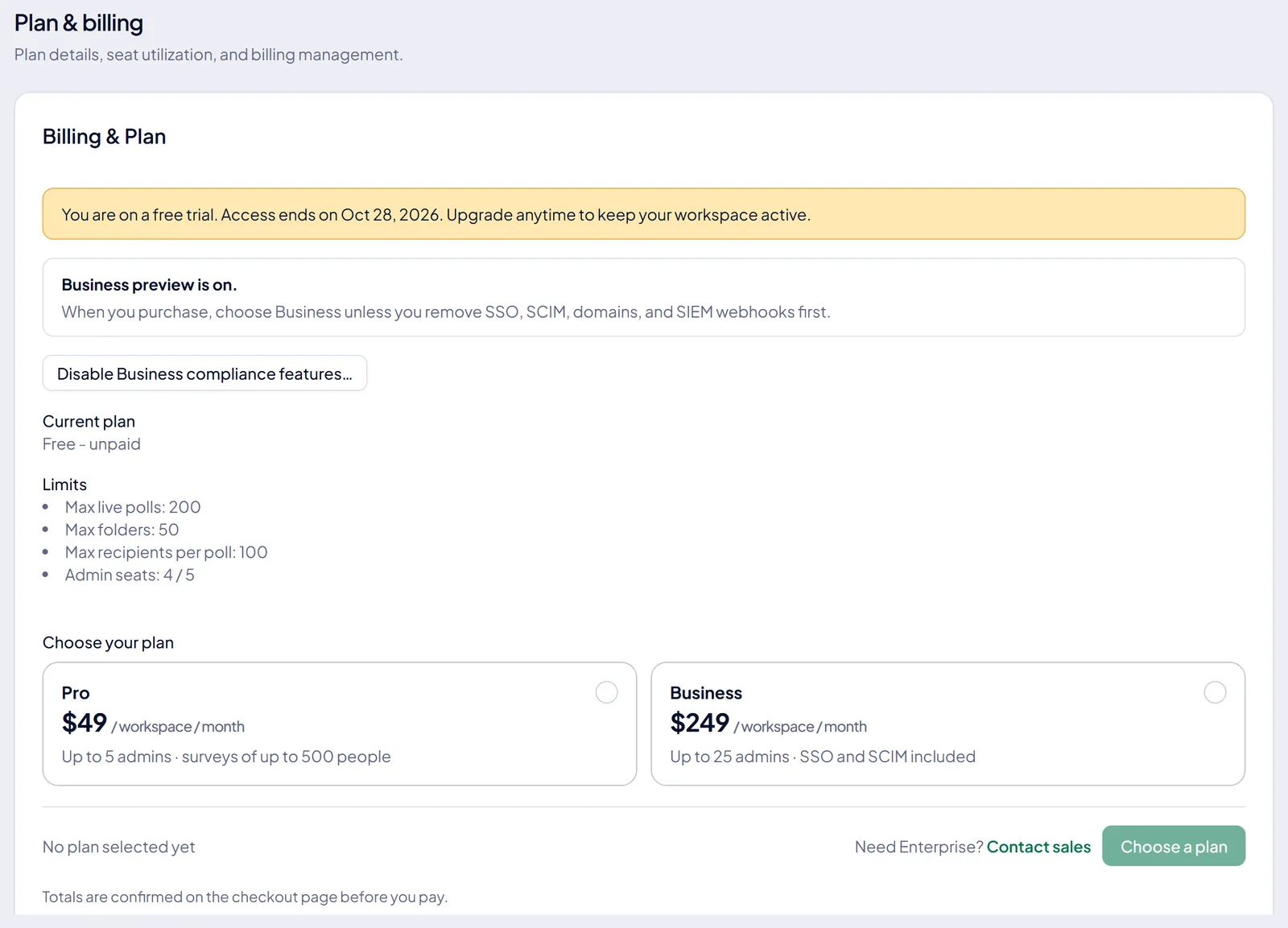
Every new InviziPoll workspace starts on a 14-day trial with Pro limits, and owners can switch on the Business features preview during the trial to test SSO, SCIM, verified domains, and SIEM webhooks. This guide covers how the trial works, what each plan includes, and what happens if a trial or subscription ends.
#Trial
New workspaces get a 14-day free trial. The app shows how many days remain, with reminders as the trial approaches its end.
During the trial you get Pro-sized quotas for polls, folders, recipients and seats, plus an evaluation allowance of AI poll authoring. The AI numbers for every plan are on AI usage and fair use.
If the trial ends without a paid subscription, the workspace moves to the free plan:
- You can still sign in, read existing polls and results, and create and edit polls up to the free limit of 3 live polls.
- AI poll authoring, bulk distribution, creating more folders, and other paid settings need an upgrade from Subscription.
Nothing is deleted when a trial ends. What happens when your trial ends walks through it.
Some long-lived workspaces are exempt: an ops-granted state with no trial end date. Exempt workspaces keep paid-feature access, but an exempt workspace on the free plan has no AI authoring. Subscription in your workspace is authoritative for what applies to you.
#Subscription management
Open Subscription in the admin sidebar to see your plan, seat usage and quota usage, and to upgrade.
#Plan quotas
Self-serve pricing is on the Pricing page. The table below is a reference; your Subscription page is authoritative, especially on a custom or sales-assisted plan.
| Tier | Max admins | Max live polls | Max folders |
|---|---|---|---|
| Free (after trial) | 1 | 3 | 1 |
| Trial (14-day) | 5 | 200 | 50 |
| Pro | 5 | 200 | 50 |
| Business | 25 | 500 | 200 |
| Enterprise | 1,000 | Unlimited§ | Unlimited§ |
| Tier | Max recipients / poll | Max access-code recipients / poll | SSO / domains / SIEM |
|---|---|---|---|
| Free (after trial) | 50 | 25 | No |
| Trial (14-day) | 2,000 | 25 | Preview† |
| Pro | 2,000 | 100 | No |
| Business | 5,000 | 500 | Yes |
| Enterprise | 25,000 | 5,000 | Yes |
| Tier | SCIM |
|---|---|
| Free (after trial) | No |
| Trial (14-day) | Preview† |
| Pro | Add-on‡ |
| Business | Yes |
| Enterprise | Yes |
The free plan's one folder is the default folder every workspace needs to hold its polls; extra team folders are a paid feature.
† During a trial, the workspace owner can switch on the Business features preview from Subscription (Enable Business features for this trial). It unlocks SSO, SCIM, verified domains and SIEM webhooks for the rest of the trial. Without it, a trial doesn't have them. ‡ SCIM is gated separately from the rest of the compliance bundle. SSO, verified domains and SIEM unlock together at Business. SCIM unlocks at Business, or on a paid Pro plan with the SCIM add-on. A Pro workspace with the add-on has SCIM and doesn't have SSO. § Enterprise "unlimited" items are subject to fair use and infrastructure limits.
A note on SCIM and offboarding
After a plan lapses, SCIM reads, deleting a user and deactivating one keep working; creating users and other updates stop. So your identity provider can still deprovision a departing employee as usual, whether it deletes them or sets them inactive. See SCIM directory sync.
#The consultants and agencies licence
Consultancies, investigators and fractional HR who run surveys inside client engagements don't buy one of the plans above. They hold a licence that sits on their own workspace and sponsors the client workspaces they create.
| Piece | What it means |
|---|---|
| Annual licence | $3,588 a year |
| Included engagements | five live client workspaces |
| Extra engagements | $59 a month each, invoiced by us |
| Client workspaces | no subscription, no card |
The licence isn't sold through self-serve checkout yet. Contact us to get one. A sponsored client workspace reads its entitlement from the licence, stays on the free plan tier, and doesn't inherit the compliance bundle. Its AI authoring comes from the licence too, with a monthly ceiling. A client that wants SSO or SCIM buys its own plan or takes over its own subscription. The full model is in The consultants and agencies licence.
#Which features need an active plan
Most gates in the product are on your entitlement ("active paid, trial, or exempt"), not on your plan name. A trial workspace is on the free tier with an active entitlement, so it gets everything in the first group. A few features sit behind Business and Enterprise; a trial reaches those through the Business features preview.
| Feature | Needs |
|---|---|
| Recurring pulse series | active plan or trial |
| Anonymous replies and return codes | active plan or trial |
| Share a slice, 3 live links per poll | active plan or trial |
| Share a slice, 20 live links per poll | Business, Enterprise, or preview |
| Speak-up inbox | Business, Enterprise, or preview |
| Bulk distribution and roster attributes | active plan or trial |
| AI poll authoring | trial or paid plan |
| AI reading of a pasted form | AI poll authoring |
| Importing an export file | every plan |
| You said, we did action plans | every plan |
| Posting an update to Slack | active plan or trial |
Pasting a form on a workspace without AI authoring still works: it's parsed in your browser for free. The free plan can publish one employer rating a calendar quarter, but only one whose roster was set during your trial: Free can't attach a contact list to a rating. Active plans aren't limited. See Recurring pulse series, Share a slice, The Speak-up inbox and case status and Importing questions from another tool for each gate in context.
#AI limits
AI generate, polish and single-question improve aren't available on the free plan or once a trial has ended without a subscription. In a workspace with two or more admins, each person can use at most half of each daily allowance. Daily limits, what a pasted import costs, the trial's paste allowance and the monthly AI capacity all live on AI usage and fair use. How to use the features is in AI poll building.
#Upgrading
Pro and Business are available through self-serve checkout. Enterprise is usually sales-assisted: contact us for pricing and compliance rollout.
Upgrade prompts appear when you reach a poll, seat or AI limit.